A logo is often the first visual impression someone has of your brand.
But here’s what most people get wrong: they treat logo design like a design problem. They focus on making it look cool, making it unique, making it trendy.
That’s backward.
A good logo isn’t first a design problem. It’s a strategy problem. Before you put pen to paper or open design software, you need to understand what your logo is supposed to communicate. Who are you? What do you stand for? How do you want to be perceived?
The design is just the visual expression of that clarity.
In this guide, I’m walking you through the complete logo design process from research and discovery all the way through finalization and documentation. Whether you’re designing your own logo or briefing a designer, this process will help you create something that actually works.
What Makes a Logo Work?
Before we dive into the process, let’s be clear about what you’re trying to achieve.
A great logo:
- Is memorable
- Is simple enough to work at any size
- Reflects your brand positioning
- Works in color and black-and-white
- Doesn't rely on trends that will feel dated in two years
- Communicates something meaningful about who you are
A logo doesn’t need to explain what your business does. It doesn’t need to be clever. It doesn’t need to win design awards.
It needs to be recognizable and aligned with your brand strategy.
What You'll Learn
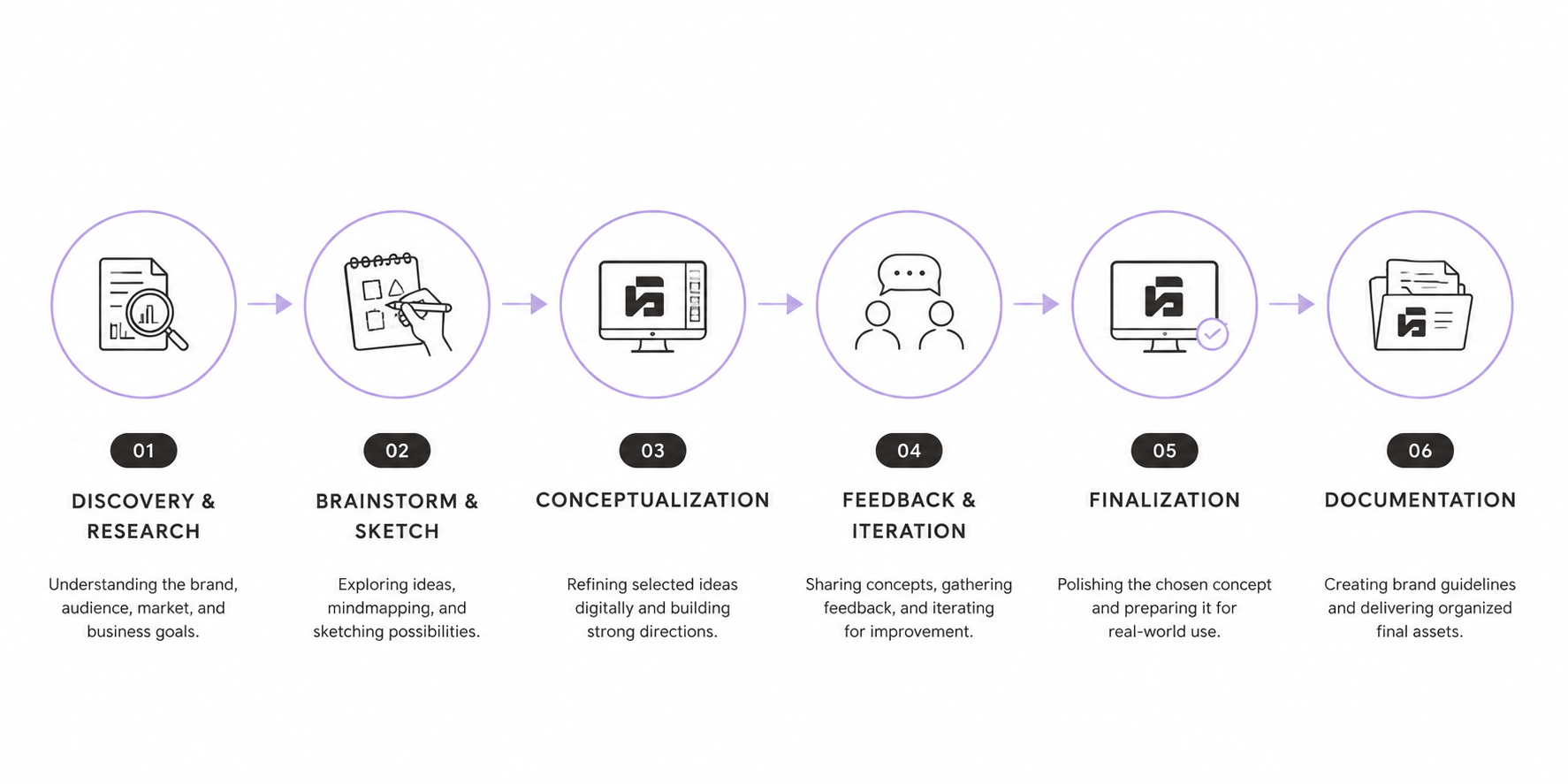
ToggleStep 1: Research and Discovery
You can’t design a logo without understanding what you’re designing for.
Too many people skip this step and jump straight to sketching. That’s why they end up with logos that look cool but don’t reflect their brand.
Understand Your Brand First
Before you design anything, you need clarity on who you are.
Start by answering these questions for yourself:
What’s your positioning? (Not “I’m a designer” but “I help coaches build premium brands.”) What are your core values? What’s your personality? Who are your customers? What do you want them to feel when they see your brand?
If you don’t have clear answers to these questions, you’re not ready to design a logo yet. Do brand strategy first.
Your logo should be a visual representation of your positioning and personality. Everything flows from that clarity.
I worked with a coach who initially wanted a logo with a mountain (representing “climbing toward goals”). But that’s generic. Half the coaching brands use mountains.
Once she got clear on her positioning “I help ambitious women escape corporate burnout and build thriving businesses” the logo direction changed completely. A mountain didn’t communicate that. Transformation did.
Analyze Your Competitors
Look at 5–10 logos from competitors. Not to copy them, but to understand what’s already been done.
What symbols are overused in your industry? What color palettes are common? What style (modern, minimal, playful, luxury) dominates?
This teaches you what not to do. The goal isn’t to blend in it’s to stand out.
If every logo in your industry is clean and minimal, maybe you go more distinctive. If every logo is playful and colorful, maybe you go refined and minimal.
Create a Mood Board
Gather visual inspiration. Not just logos anything visual that inspires you.
Collect images that feel right for your brand. Colors. Typography. Textures. Photography. Illustrations. Patterns. Not because you’ll copy them, but because they help you articulate a feeling.
A mood board helps you communicate your vision when you’re explaining it to a designer or brainstorming visually.
Step 2: Brainstorm and Sketch
Now that you understand your brand, it’s time to explore ideas.
This step isn’t about creating a finished logo. It’s about generating possibilities.
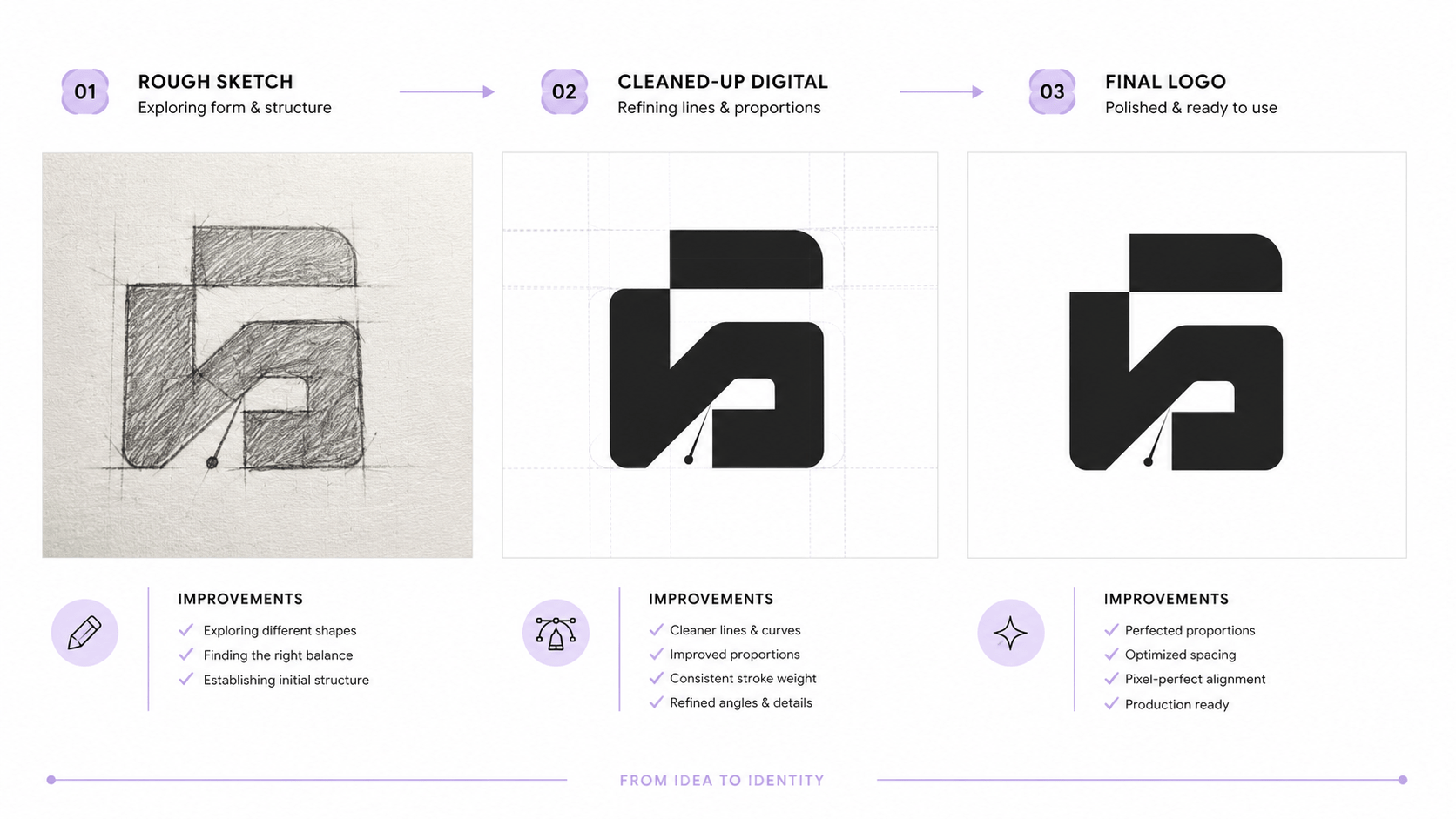
The Power of Quantity
The best ideas come from generating lots of ideas. Aim for 20–30 rough sketches. Yes, really.
Most people sketch 3–5 ideas and pick their favorite. Then they wonder why their logo doesn’t feel quite right.
The more you explore, the better your best ideas become.
Spend 30–60 minutes sketching freely. Don’t overthink. Let your hand move. Explore different directions: geometric shapes, wordmarks (text-based logos), icons paired with text, abstract symbols.
Sketching Guidelines
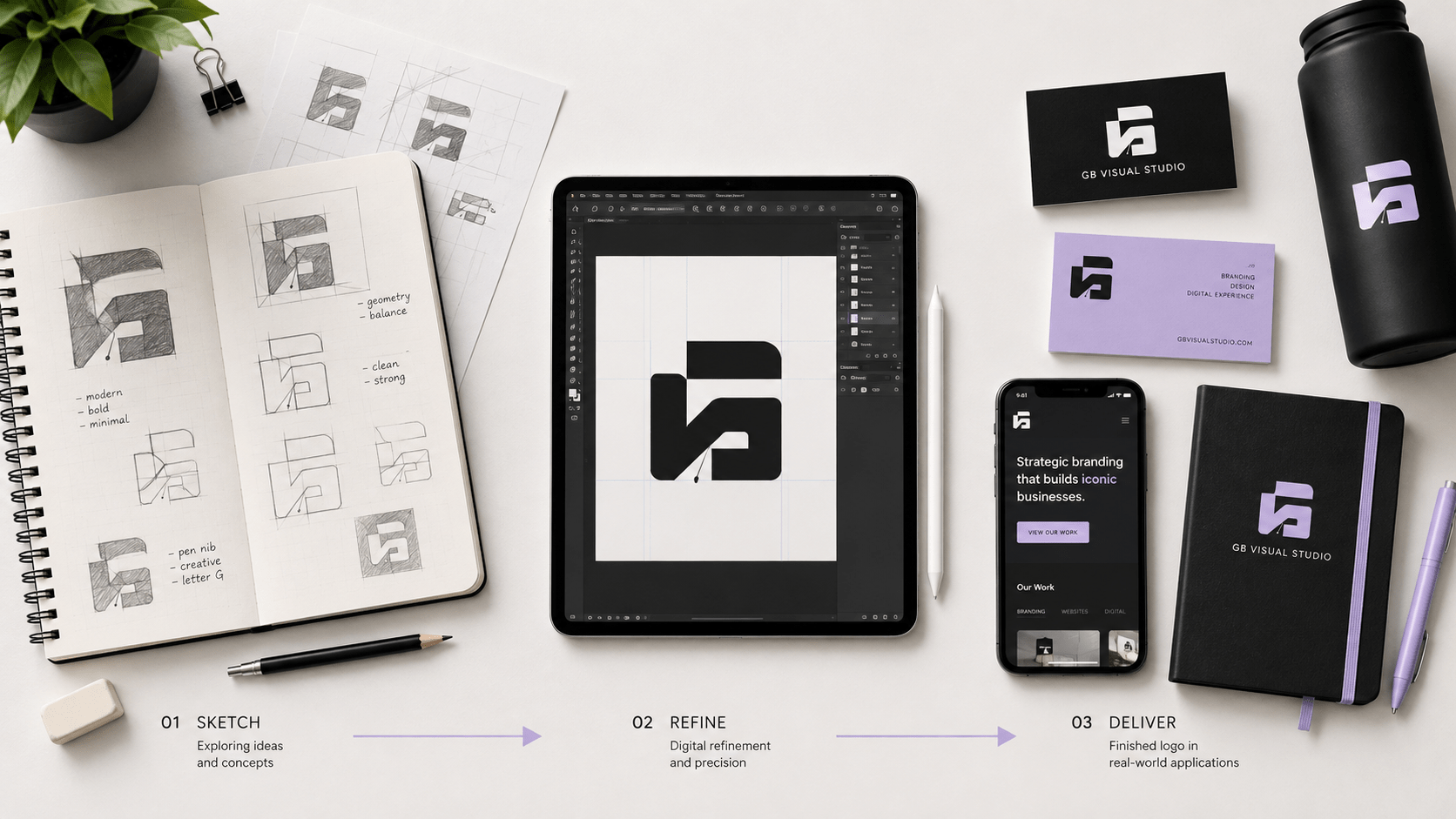
Use pen and paper, not the computer. Sketching on paper is faster and forces you to be loose and exploratory.
Don’t aim for perfection. Rough is the point. This is ideation, not execution.
Think about your positioning. How do you visualize it? If you help coaches build premium brands, what visual would communicate that? If you’re a sustainable skincare brand, what imagery represents that?
Sketch from different angles. Explore different concepts. Play with letterforms. Try combining symbols with text.
From Sketches to Concepts
After 30+ sketches, you’ll start to see patterns. Certain ideas will feel stronger. Certain directions will excite you.
Pick 5–8 of your strongest sketches. These become your concepts to develop further.
Step 3: Conceptualization and Refinement
Now you’re moving to the computer (or hiring a designer to do this part).
This is where your best sketches become polished concepts.
Digital Refinement
Take your 5–8 strongest sketches and refine them digitally.
Clean up the lines. Improve the proportions. Make it work at different sizes. Simplify it further.
A good logo should work at 1-inch size and 10-inch size. If details get lost when you shrink it down, simplify it more.
Explore Type Options
If your logo includes text, explore different typography options.
Try different fonts. Try different arrangements. Try the name alongside, below, or integrated into the icon.
Remember: your fonts should reinforce your positioning. A luxury brand won’t use a playful rounded font. A playful brand won’t use a serious, formal serif.
Color Exploration
Design your logo in black and white first.
If it doesn’t work without color, it won’t work with it. A good logo has strong form, not just good color.
Once the form is solid, explore color. Create versions in your brand colors. See what works best.
Remember: your logo should work in color and in black and white. Design accordingly.
Step 4: Feedback and Iteration
At this point, you have 5–8 solid concepts. Now you need feedback.
Who to Ask
Ask people who represent your ideal customer, not just designers or friends.
A coach might ask a client. A product founder might ask users. A freelancer might ask past clients.
Ask 5–10 people. Show them your concepts without explaining them. Ask:
- What's your first impression?
- What do you think this brand stands for?
- Does this feel [premium/playful/trustworthy - whatever your brand positioning is]?
Their reactions will tell you a lot.
What Feedback to Trust
Listen to patterns, not individual opinions.
If 7 out of 10 people say concept A doesn’t feel premium, that’s feedback worth acting on. If one person doesn’t like it, that’s just one opinion.
Feedback on whether your logo communicates your positioning is valuable. (“This doesn’t feel premium” is useful. “I don’t like that color” is personal preference.)
Feedback on whether it’s memorable is valuable. (“I could see this on a business card and remember it” is useful.)
Red Flags in Feedback
Watch out for feedback that pulls you in the wrong direction.
“Make it more creative.” Vague. Ignore.
“Add more to it.” Usually means it needs to be simpler, not more complex.
“Make it unique.” It probably is. People just need time to get used to it.
Trust the feedback that clarifies your positioning, not the feedback that pushes you toward trends or personal taste.
Step 5: Finalization
Based on feedback, you’ve likely narrowed down to 2–3 strong concepts. Time to finalize one.
Pick Your Direction
Choose the concept that best represents your positioning and resonates with your ideal customer.
Don’t pick the one that’s most trendy. Pick the one that’s most you.
Refine Every Detail
Now the real work happens. Refine your chosen concept until every curve, every line, every proportion feels right.
This isn’t perfectionism. This is craft. Small adjustments make the difference between a good logo and a great one.
Adjust letter spacing if it’s a wordmark. Adjust the relationship between the icon and text. Adjust line weights.
Test Scalability
Your logo needs to work at any size.
Print it at 1 inch. Print it at 6 inches. Put it on a tiny social media avatar. Put it on a billboard mockup.
Does it still read? Do small details get lost? Does the proportion feel right at different scales?
If it breaks at small sizes, simplify it more.
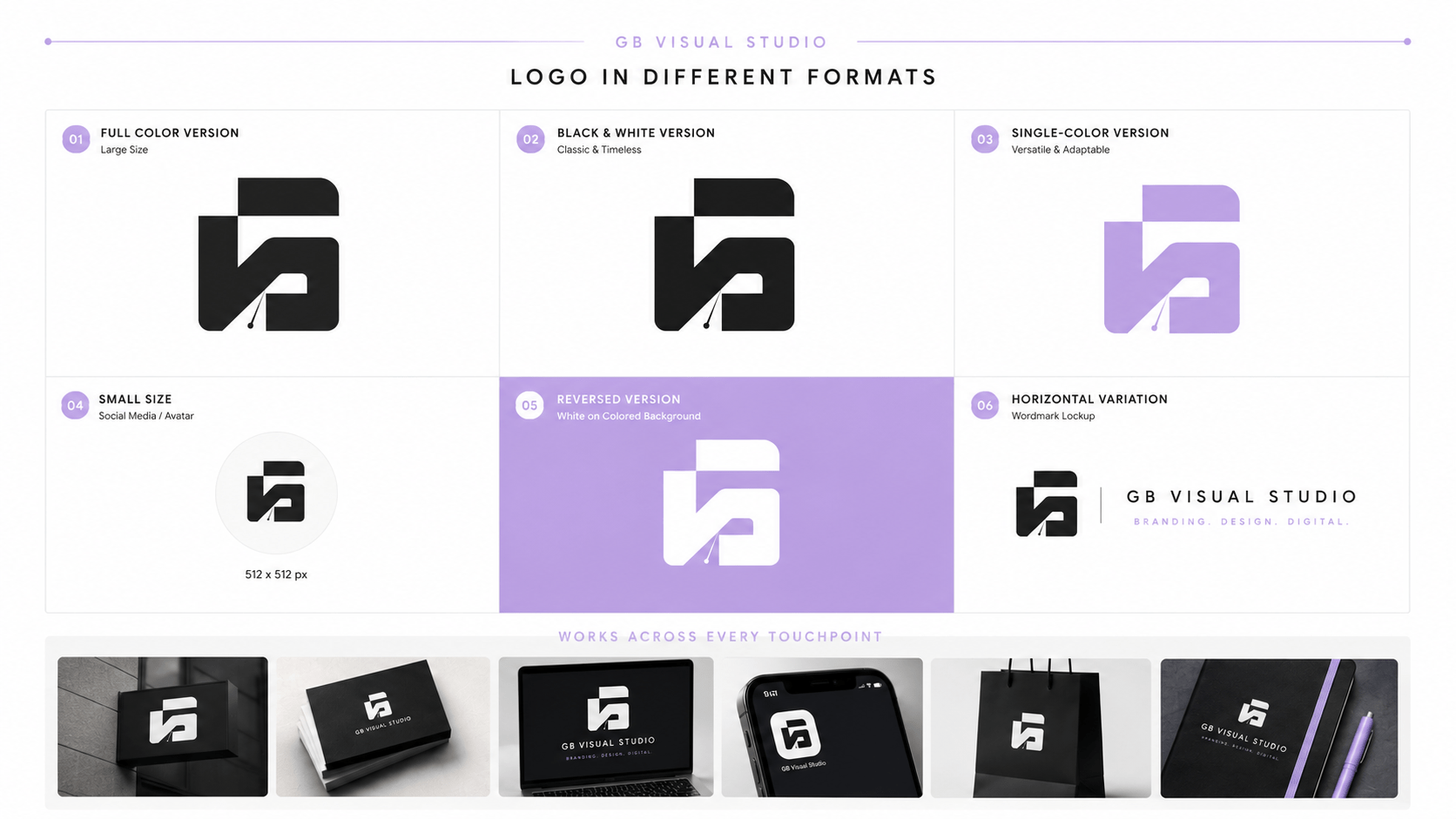
Create Color Variations
Create versions of your final logo:
- Full color (your brand colors)
- Black version
- White version
- Single color (if needed)
- Reversed (white logo on dark background)
Your logo needs to work in all of these variations. If it doesn’t, adjust it.
Step 6: Documentation
Your logo is finalized. Now document it.
File Formats
Your logo should exist in multiple formats for different uses:
PNG — web use, transparent background, any size
SVG — scalable, web and print, always crisp
PDF — print use, high quality, archives well
EPS — professional print files, vector format
Ask your designer for all of these. If you’re doing this yourself, design in a vector program (Illustrator, Affinity Designer, or free tools like Inkscape).
Specifications
Document your logo specifications:
- Minimum size (how small can it go before it loses legibility)
- Clear space (how much space should surround it)
- Color specifications (hex codes, RGB values, Pantone if applicable)
- Font specifications (if it's a wordmark)
- Usage guidelines (do's and don'ts)
This becomes part of your brand guidelines.
The Brand Guidelines walks you through complete documentation.
Tools and Resources
If you’re designing your own logo, here are tools that work well:
Design Software
Canva Pro — easiest option for beginners, comes with templates and logo builders
Adobe Illustrator — industry standard, more expensive, steeper learning curve
Affinity Designer — one-time purchase, cheaper than Illustrator, powerful
Inkscape — free, open-source, feature-rich but less intuitive
Learning Resources
Skillshare — logo design courses from professional designers
CreativeLive — free and paid logo design workshops
Domestika — design community with tutorials and inspiration
Dribbble — gallery of professional logos for inspiration (don’t copy, just study)
Logo Inspiration (For Study, Not Copying)
LogoLounge — curated collection of professional logos
Brand New — logo design critique and analysis
Branding Served — curated branding and logo work
Behance — designers sharing their process
Common Logo Mistakes and Fixes
I’ve seen these mistakes repeatedly. Here’s how to avoid them.
Mistake: Too Much Detail
A logo with lots of small details won’t work at small sizes. It becomes a muddy blob when shrunk down.
The fix: Simplify. Remove anything that isn’t essential. A good logo communicates with minimal elements.
Mistake: Relying on Color
A logo that only works in color is limiting. When printed in black and white, it falls apart.
The fix: Design in black and white first. Make sure it works without color. Color is enhancement, not foundation.
Mistake: Trendy Design Choices
You design a logo with the trendy gradient, the trendy font, the trendy style. In two years, it looks dated.
The fix: Avoid trends. Go for timeless. A simple, well-executed logo works for decades.
Mistake: Too Complex
Your logo tries to communicate everything about your business. It’s detailed. It’s intricate. It’s forgettable.
The fix: Logos should be simple enough to draw from memory. If you can’t sketch it quickly, it’s too complex.
Mistake: Generic Symbol
Your logo uses an overused symbol (mountains for growth, light bulbs for ideas, arrows for progress).
The fix: Find a symbol or approach that’s unique to your positioning. The best logos are distinctive because they reflect something specific about that brand.
Mistake: Skipping the Strategy
You design a logo without understanding your positioning. It looks cool but doesn’t communicate who you are.
The fix: Do the strategic work first. Your positioning should inform your design, not the other way around.
Conclusion
A logo is just one part of your brand identity. But it’s a visible, memorable part.
The difference between a logo that works and one that doesn’t isn’t talent. It’s process.
Follow the process. Do the discovery work. Sketch extensively. Get real feedback. Refine thoughtfully. Document completely.
The logo that results won’t just look good. It’ll work for years. It’ll feel aligned with who you are. It’ll communicate something meaningful about your brand.
That’s a logo worth designing.
Or if you need help with the positioning first, read How to positioning the brand. A clear positioning makes every design decision easier.